


I read Google's August 10 announcement, together with the Ads and Analytics help pages. The announcement has three sections, but it can be broken into four specific capabilities, listed below. Calling them four entry points was too vague. It leaves readers asking what Google actually added.
What are the four features?
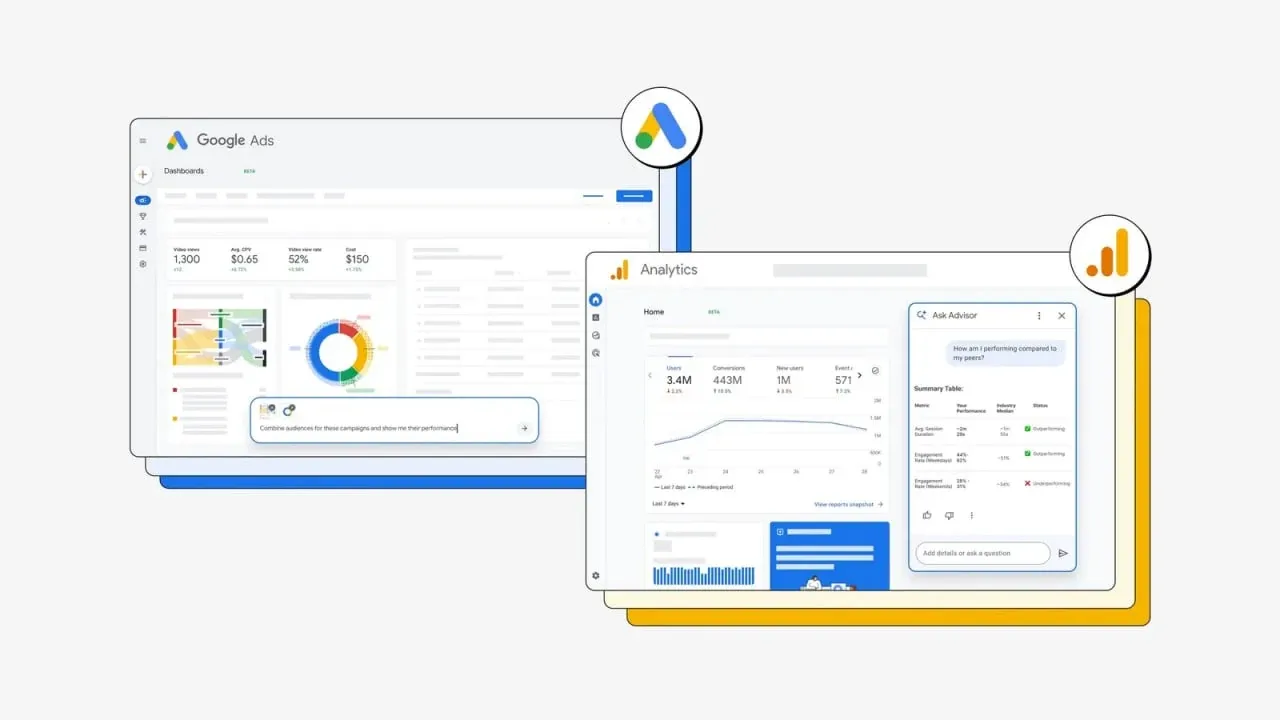
- AI Overviews on the Google Analytics homepage. They summarize changes worth noticing since the last visit, such as a seasonal sales peak or a traffic movement. A click on a card can carry its context into Ask Advisor.
- Personalized AI insight cards and a prompt box on the Google Ads homepage. A media buyer can ask what is affecting impression share or which trends may affect a campaign. Google presents the cards and prompt box as one homepage update, so they should not be counted as a fifth feature.
- Dashboards. It turns raw data into charts from text prompts and generates a real-time explanation that accompanies the chart. Google says it is available in Ads and is coming soon to Analytics.
- New Benchmarking in Google Analytics Ask Advisor. It compares campaign performance with anonymized averages from similar businesses and gives the team a peer reference point.
The four features sit across the homepage, reporting, and Ask Advisor. They appear in different parts of the products and see different data.
They cannot take over an entire advertising operation for the team.
Two limits matter immediately for global teams. Ask Advisor in Google Ads is not currently available in MCC accounts. Ask Advisor in Google Analytics works only with data from the current property, and Google says it is currently available in properties whose selected language is English. A team that separates countries into sub-accounts and properties still needs to inspect them one by one. There is no single place where the tool can see every market together.
The features are still worth testing, but the boundary needs to be clear. Treat them as helpers that can read account data, explain it, and make suggestions. Keep reporting definitions, cross-market attribution, and account changes inside the team's own review process.
The account and property decide what is available
The announcement does not spell out every feature's regional rollout. Dashboards has the clearest status in the post, with Ads available and Analytics still to come. The two Ask Advisor help pages retain their beta label, and the Ads page says the account itself must be eligible.
Do not build an internal rollout calendar around the announcement date. Open the sub-accounts and properties that will be used for testing, then check the top-right menu, homepage cards, and reporting entry points. For Analytics Ask Advisor, check the property's selected language as well. If an entry point has not appeared yet, there is no need to schedule a test. Prepare the sample and questions, then run the test when it does.
Dashboards is useful for reconciling reports
Dashboards can reveal whether the team and the tool are using the same data definitions. During a test, pick three questions that internal reporting already answers, such as a market's cost per acquisition over the past 28 days, a campaign's conversion movement, or spend by market during the same period. Ask Dashboards the same questions, then compare its charts and numbers with the internal report.
The difference may not be arithmetic. Conversion windows, currencies, time zones, and date ranges can all produce different answers from the same underlying account. Keep a record of the gaps. It will show where an AI-generated summary is useful. When the numbers do not reconcile, the feature can still serve as a way to find leads or draft a report.
Read homepage insights against the business calendar
Homepage cards choose changes that they consider important. Global accounts carry their own complication. Black Friday, Prime Day, Japan's Golden Week, Ramadan, and local payday cycles can all produce seasonal shifts in traffic and conversions. A model that misses the business calendar may flag an ordinary seasonal movement.
During the test, keep the manual review routine in place and save screenshots of the homepage insights. After two weeks, look at the changes it missed and the ordinary movements it flagged. That record answers a practical question. Should the team put this view on the first screen it opens each day?
Benchmarking involves peer groups and data sharing
Google Analytics' existing Benchmarking documentation is specific. A property must enable Modeling contributions and business insights in Admin under Account Settings before it is eligible for benchmark data. Peer groups draw on the industry category selected during setup, the website URL, and app attributes. Users can change the group. Google also describes minimum property and user-volume thresholds, along with encryption and aggregation for the data.
This documentation is useful for checking an existing setup. It does not prove that the new benchmarking inside Ask Advisor uses exactly the same prerequisites. Google's announcement does not settle that point. When the team enables it, confirm that the industry category is accurate, then ask the data-compliance team to review the relevant sharing scope and internal requirements.
Ask Advisor can diagnose. Account changes still need review
Google Ads Help says Ask Advisor can help troubleshoot performance and policy issues, and can help implement suggestions once it has approval. The same page says advertisers remain responsible for confirming that accepted recommendations are accurate and relevant.
During a test, use diagnostic questions, such as why a market's cost per conversion has risen or why a campaign's clicks have fallen. For budgets, bids, assets, and account settings, choose a low-budget campaign, review each action before applying it, and keep every change in Google Ads change history.
At the end of two weeks, the team will have its own answer. The test record will show which questions the tools handle quickly and when they miss business context. Account changes still require a human approval. Then the team can decide what belongs in the daily workflow.